Description
[vc_row full_width=”stretch_row” css=”.vc_custom_1576060320873{padding-top: 40px !important;background-color: #000000 !important;}”][vc_column el_class=”dark-page” offset=”vc_col-lg-offset-2 vc_col-lg-8 vc_col-md-offset-2 vc_col-md-8″ css=”.vc_custom_1576055785107{padding-top: 50px !important;}”][vc_custom_heading text=”AUTOMATED BIRD NOISE REMOVAL” font_container=”tag:h1|text_align:center|color:%23e59368″ use_theme_fonts=”yes” el_class=”product_h1″ css=”.vc_custom_1575976182736{padding-top: 10px !important;}”][vc_column_text css=”.vc_custom_1576058380128{padding-top: 20px !important;}”]
DEBIRD automatically recognizes bird noises in your recordings and removes them with surgical precision.
[/vc_column_text][/vc_column][/vc_row][vc_row full_width=”stretch_row” content_placement=”middle” background_position=”center bottom” css=”.vc_custom_1576165518337{margin-top: 0px !important;padding-top: 0px !important;padding-bottom: 0px !important;background-color: #000000 !important;background-position: center !important;background-repeat: no-repeat !important;background-size: cover !important;}” el_id=”trailer”][vc_column css_animation=”none” css=”.vc_custom_1576251414341{margin-top: 0px !important;padding-right: 0px !important;padding-bottom: 0px !important;padding-left: 0px !important;}” el_id=”yt-trailer”][nitro_video width=”1200″ align=”tc” video_custom_id=”nitro_custom_css_1173701229″ control=”true” url=”https://www.youtube.com/watch?v=nQOFRriZRQs”][vc_column_text css=”.vc_custom_1576064069289{margin-bottom: 20px !important;border-right-width: 5% !important;padding-top: 30px !important;padding-right: 10% !important;padding-bottom: 50px !important;padding-left: 10% !important;background-color: rgba(0,0,0,0.68) !important;*background-color: rgb(0,0,0) !important;}” el_class=”dark-page”]
The Problem
Meet the involuntary #1 enemy of recordists and editors alike: Birds.
While their lively and delightful song is a true asset in nature ambiences, it ruins just about everything else.
As a result, countless hours are spent on the rather tedious task of cleaning recordings before one can get back to the fun part and focus on the creative process.
[/vc_column_text][vc_single_image image=”124939″ img_size=”full” alignment=”center” css_animation=”none” el_class=”birdgif”][vc_custom_heading text=”THE SOLUTION” font_container=”tag:h3|text_align:center|color:%23e59368″ use_theme_fonts=”yes” css_animation=”none” css=”.vc_custom_1576056549811{margin-top: 10% !important;padding-top: 50px !important;padding-bottom: 20px !important;background-color: rgba(0,0,0,0.68) !important;*background-color: rgb(0,0,0) !important;}”][/vc_column][/vc_row][vc_row full_width=”stretch_row” content_placement=”top” background_position=”center top” css=”.vc_custom_1576059550916{margin-top: 0px !important;margin-bottom: 0px !important;padding-top: 50px !important;padding-right: 5% !important;padding-left: 5% !important;background-color: #000000 !important;background-position: center !important;background-repeat: no-repeat !important;background-size: cover !important;}” el_class=”dark-page”][vc_column width=”1/3″][vc_icon icon_fontawesome=”fa fa-magic” color=”custom” size=”lg” align=”center” custom_color=”#e59368″][vc_column_text]
Meet DEBIRD – your simple but powerful tool that utilizes Deep Learning to do all the cleaning work for you.
[/vc_column_text][/vc_column][vc_column width=”1/3″][vc_column_text css_animation=”none”] [/vc_column_text][/vc_column][vc_column width=”1/3″][vc_icon icon_fontawesome=”fa fa-coffee” color=”custom” size=”lg” align=”center” custom_color=”#e59368″][vc_column_text]
Sit back and relax while DEBIRD effortlessly extracts all the unwanted chatter from your audio file within seconds!
[/vc_column_text][/vc_column][/vc_row][vc_row full_width=”stretch_row_content_no_spaces” content_placement=”top” background_position=”center top” css=”.vc_custom_1576060392665{margin-top: 0px !important;padding-top: 50px !important;background-color: #000000 !important;background-position: center !important;background-repeat: no-repeat !important;background-size: cover !important;}”][vc_column css=”.vc_custom_1515408341090{margin-top: 0px !important;padding-top: 0px !important;}”][vc_custom_heading text=”How to use DEBIRD?” font_container=”tag:h3|text_align:center|color:%23e59368″ use_theme_fonts=”yes” css=”.vc_custom_1576056693421{margin-bottom: 10px !important;padding-top: 80px !important;padding-bottom: 80px !important;}”][/vc_column][/vc_row][vc_row full_width=”stretch_row” content_placement=”middle” el_class=”dark-page” css=”.vc_custom_1576060401931{padding-right: 5% !important;padding-left: 5% !important;background-color: #000000 !important;}”][vc_column width=”1/2″][vc_column_text]
1
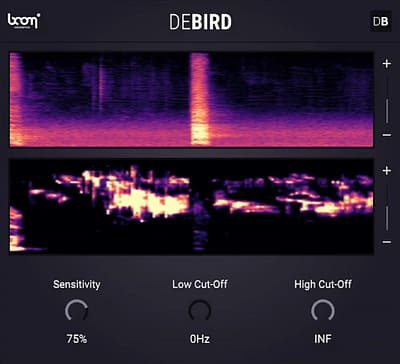
Select any sound you want to clean up and use DEBIRD on your DAWs audio tracks.
[/vc_column_text][/vc_column][vc_column width=”1/2″][vc_column_text]
[/vc_column_text][/vc_column][/vc_row][vc_row full_width=”stretch_row” content_placement=”middle” el_class=”dark-page” css=”.vc_custom_1576060411120{padding-right: 5% !important;padding-left: 5% !important;background-color: #000000 !important;}”][vc_column width=”1/2″][vc_column_text]
2
Hit Play and enjoy DEBIRD removing all the birds from your sound in REAL TIME.
[/vc_column_text][/vc_column][vc_column width=”1/2″][vc_column_text]
[/vc_column_text][/vc_column][/vc_row][vc_row full_width=”stretch_row” content_placement=”middle” el_class=”dark-page” css=”.vc_custom_1576060419763{padding-right: 5% !important;padding-bottom: 50px !important;padding-left: 5% !important;background-color: #000000 !important;}”][vc_column width=”1/2″][vc_column_text]
3
You can see the removed bird sounds in the lower spectrum display.
Adjust the built-in filters and sensitivity to your likings.
[/vc_column_text][/vc_column][vc_column width=”1/2″][vc_column_text]
[/vc_column_text][/vc_column][/vc_row][vc_row full_width=”stretch_row” disable_element=”yes”][vc_column][rev_slider_vc alias=”recenter_screenshots”][/vc_column][/vc_row][vc_row full_width=”stretch_row” content_placement=”middle” background_position=”center center” css=”.vc_custom_1576060428072{margin-top: 0px !important;margin-bottom: 0px !important;padding-top: 70px !important;padding-bottom: 0px !important;background-color: #000000 !important;}”][vc_column][vc_row_inner el_class=”dark-page”][vc_column_inner][vc_column_text el_class=”dark-page” css=”.vc_custom_1576063850955{padding-top: 30px !important;padding-bottom: 10px !important;}”]
That’s It?
Yes! It is really that simple. You need some more features? You can also do the following:
[/vc_column_text][/vc_column_inner][vc_column_inner width=”1/2″ offset=”vc_col-lg-offset-0 vc_col-lg-6 vc_col-md-offset-0 vc_col-md-6 vc_col-xs-12″ css=”.vc_custom_1745486473747{margin-bottom: 0px !important;border-top-width: 2px !important;border-right-width: 2px !important;border-bottom-width: 2px !important;border-left-width: 2px !important;padding-top: 5% !important;padding-right: 5% !important;padding-bottom: 5% !important;padding-left: 5% !important;background-color: #393939 !important;border-left-color: #000000 !important;border-left-style: solid !important;border-right-color: #000000 !important;border-right-style: solid !important;border-top-color: #000000 !important;border-top-style: solid !important;border-bottom-color: #000000 !important;border-bottom-style: solid !important;}”][vc_single_image image=”124827″ img_size=”100×50″ alignment=”center” css=”.vc_custom_1575991114777{padding-top: 5px !important;padding-right: 5px !important;padding-bottom: 5px !important;padding-left: 5px !important;}”][vc_column_text]
Would you like to keep certain sounds that would otherwise be removed?
No problem! Use the Low- and High-Pass filters to show DEBIRD what frequencies to keep.
[/vc_column_text][/vc_column_inner][vc_column_inner width=”1/2″ offset=”vc_col-lg-offset-0 vc_col-lg-6 vc_col-md-6 vc_col-xs-12″ css=”.vc_custom_1745486480900{border-top-width: 2px !important;border-right-width: 2px !important;border-bottom-width: 2px !important;border-left-width: 2px !important;padding-top: 5% !important;padding-right: 5% !important;padding-bottom: 5% !important;padding-left: 5% !important;background-color: #393939 !important;border-left-color: #000000 !important;border-left-style: solid !important;border-right-color: #000000 !important;border-right-style: solid !important;border-top-color: #000000 !important;border-top-style: solid !important;border-bottom-color: #000000 !important;border-bottom-style: solid !important;}”][vc_single_image image=”124826″ img_size=”100×50″ alignment=”center” css=”.vc_custom_1575991119830{padding-top: 5px !important;padding-right: 5px !important;padding-bottom: 5px !important;padding-left: 5px !important;}”][vc_column_text css=”.vc_custom_1637678727793{margin-bottom: 59px !important;}”]
Solo and export the extracted bird sounds if needed.
DEBIRD can be used in the exact opposite way it was designed for.
[/vc_column_text][/vc_column_inner][/vc_row_inner][vc_column_text el_class=”dark-page” css=”.vc_custom_1576064097076{padding-top: 50px !important;padding-bottom: 10px !important;}”]
Your Key Benefits
[/vc_column_text][vc_row_inner css=”.vc_custom_1576056247808{padding-top: 40px !important;padding-bottom: 10px !important;}” el_class=”dark-page”][vc_column_inner width=”1/4″ css=”.vc_custom_1548420332096{margin-bottom: 35px !important;}” offset=”vc_col-lg-offset-0″][vc_icon icon_fontawesome=”fa fa-clock-o” color=”custom” size=”xl” align=”center” custom_color=”#e59368″][vc_custom_heading text=”Timesaver” font_container=”tag:h5|text_align:center|color:%23ffffff” use_theme_fonts=”yes” el_class=”product_h1″ css=”.vc_custom_1576058614164{margin-bottom: 10px !important;}”][vc_column_text]
DEBIRD turns hours of work into seconds.
[/vc_column_text][/vc_column_inner][vc_column_inner width=”1/4″][vc_icon icon_fontawesome=”fa fa-tachometer” color=”custom” size=”xl” align=”center” custom_color=”#e59368″][vc_custom_heading text=”Fast Processing” font_container=”tag:h5|text_align:center|color:%23ffffff” use_theme_fonts=”yes” el_class=”product_h1″ css=”.vc_custom_1576058621180{margin-bottom: 10px !important;}”][vc_column_text]
No matter how fast you remove bird sounds, DEBIRD is faster.
[/vc_column_text][/vc_column_inner][vc_column_inner width=”1/4″][vc_icon icon_fontawesome=”fa fa-moon-o” color=”custom” size=”xl” align=”center” custom_color=”#e59368″][vc_custom_heading text=”Cut the Slack” font_container=”tag:h5|text_align:center|color:%23ffffff” use_theme_fonts=”yes” el_class=”product_h1″ css=”.vc_custom_1576058659029{margin-bottom: 10px !important;}”][vc_column_text]
No more need to plan recording sessions at night or use invasive methods such as scaring off birds.
[/vc_column_text][/vc_column_inner][vc_column_inner width=”1/4″][vc_icon icon_fontawesome=”fa fa-cogs” color=”custom” size=”xl” align=”center” custom_color=”#e59368″][vc_custom_heading text=”Smart” font_container=”tag:h5|text_align:center|color:%23ffffff” use_theme_fonts=”yes” el_class=”product_h1″ css=”.vc_custom_1576058635646{margin-bottom: 10px !important;}”][vc_column_text]
DEBIRD‘s Machine Learning capabilities help the tool to improve over time.
Here’s how.
[/vc_column_text][/vc_column_inner][/vc_row_inner][/vc_column][/vc_row][vc_row full_width=”stretch_row” disable_element=”yes” css=”.vc_custom_1575908946972{padding-top: 80px !important;}”][vc_column css=”.vc_custom_1548773557596{padding-bottom: 40px !important;}”][vc_row_inner][vc_column_inner offset=”vc_col-lg-offset-2 vc_col-lg-8 vc_col-md-offset-2 vc_col-md-8″][vc_custom_heading text=”FLEXIBLE AND YET SO EASY TO USE” font_container=”tag:h1|text_align:center|color:%230c0c0c” use_theme_fonts=”yes” el_class=”product_h1″][vc_column_text]
ReCenter is an incredibly useful tool, a little helper you don’t want to miss once you’ve worked with it. It is very easy to set up and provides immediate clean stereo signals.
[/vc_column_text][/vc_column_inner][/vc_row_inner][/vc_column][/vc_row][vc_row disable_element=”yes”][vc_column offset=”vc_hidden-lg vc_hidden-md vc_hidden-sm vc_hidden-xs”][vc_custom_heading text=”REVIEWS” font_container=”tag:h3|text_align:center|color:%230c0c0c” use_theme_fonts=”yes”][vc_row_inner css=”.vc_custom_1515077106207{padding-bottom: 30px !important;}”][vc_column_inner width=”1/3″][vc_column_text]
• •
“BOOM Library is manifesting with Enforcer a new generation plugin to push those subs, make sound effects bigger, create something new and in your face or create low-end sub sound shaking the audience.”
[/vc_column_text][/vc_column_inner][vc_column_inner width=”1/3″][vc_column_text]
• •
“I highly suggest musicians get their hands on this tool which I feel is essential for Hip Hop and Dance genres“
[/vc_column_text][/vc_column_inner][vc_column_inner width=”1/3″][vc_column_text]
• •
“Enforcer delivers a lot of sub-bass and features without really any downsides. Electronic music producers, game audio people and sound designers will love it!“
[/vc_column_text][/vc_column_inner][/vc_row_inner][vc_row_inner css=”.vc_custom_1515077106207{padding-bottom: 30px !important;}”][vc_column_inner width=”1/3″][vc_column_text]
• •
“BOOM Library seems to know what to do, and Enforcer is another proof of a marvelously useful tool which will save us a lot of time.”
[/vc_column_text][/vc_column_inner][/vc_row_inner][/vc_column][/vc_row][vc_row full_width=”stretch_row_content_no_spaces” background_position=”center bottom” css=”.vc_custom_1576057746440{margin-bottom: -100px !important;padding-top: -20px !important;padding-bottom: 400px !important;background: #050505 url(https://images.boomlibrary.com/cb:EFBL.1a740/w:auto/h:auto/q:mauto/f:best/https://boomlibrary.com/wp-content/uploads/2017/11/turbine-separator.jpg?id=7255) !important;background-position: center !important;background-repeat: no-repeat !important;background-size: cover !important;}”][vc_column css=”.vc_custom_1575974360063{padding-right: 25% !important;padding-bottom: 100px !important;padding-left: 25% !important;}”][/vc_column][/vc_row][vc_row full_width=”stretch_row” css_animation=”none” css=”.vc_custom_1576061163730{margin-bottom: 50px !important;}”][vc_column][vc_custom_heading text=”FIRST REACTIONS” font_container=”tag:h3|text_align:center|color:%230c0c0c” use_theme_fonts=”yes”][vc_row_inner css=”.vc_custom_1576057809537{padding-right: 25% !important;padding-left: 25% !important;}”][vc_column_inner width=”1/5″ offset=”vc_hidden-xs”][vc_icon icon_fontawesome=”fa fa-star” color=”sandy_brown” align=”center”][/vc_column_inner][vc_column_inner width=”1/5″ offset=”vc_hidden-xs”][vc_icon icon_fontawesome=”fa fa-star” color=”sandy_brown” align=”center”][/vc_column_inner][vc_column_inner width=”1/5″ offset=”vc_hidden-xs”][vc_icon icon_fontawesome=”fa fa-star” color=”sandy_brown” align=”center”][/vc_column_inner][vc_column_inner width=”1/5″ offset=”vc_hidden-xs”][vc_icon icon_fontawesome=”fa fa-star” color=”sandy_brown” align=”center”][/vc_column_inner][vc_column_inner width=”1/5″ offset=”vc_hidden-xs”][vc_icon icon_fontawesome=”fa fa-star” color=”sandy_brown” align=”center”][/vc_column_inner][/vc_row_inner][vc_row_inner css=”.vc_custom_1515077106207{padding-bottom: 30px !important;}”][vc_column_inner][vc_column_text css=”.vc_custom_1576601112085{margin-bottom: 100px !important;}”]
“Whoah! DEBIRD is game-changer!
BOOM continues to knock it out of the park… I can’t even come up with any more sports metaphors, I’m so excited! Can’t wait to hear what’s next!“
– Zachary Quarles (Principle Audio Designer, Playground Games)
“NEEEED”
•
“THIS WILL BE A LIFE SAVER FOR MANY”
•
“IT’S A GAME CHANGER FOR POST & FIELD RECORDING”
•
“OH MY GOD. GENIUS”
•
“THIS TOOL IS A BLESSING!”
[/vc_column_text][/vc_column_inner][/vc_row_inner][/vc_column][/vc_row][vc_row css=”.vc_custom_1575973327158{margin-top: -100px !important;}”][vc_column][vc_custom_heading text=”DeBird At A Glance” font_container=”tag:h3|text_align:center|color:%230c0c0c” use_theme_fonts=”yes”][vc_row_inner css=”.vc_custom_1576165637694{padding-bottom: 30px !important;}” el_id=”audio-demo”][vc_column_inner width=”1/2″][vc_single_image image=”124794″ img_size=”large”][vc_column_text][/vc_column_text][/vc_column_inner][vc_column_inner width=”1/2″][vc_column_text]
KEY FEATURES
- Remove bird noises in real time.
- Radically simplify and expedite your workflow.
- Super-fast processing of audio files.
- The advanced Machine Learning algorithm guarantees the most precise removal of bird sounds without audible loss of the desired sound frequencies.
- Use the built-in filters to choose frequencies you want to keep to exclude them from the removal process.
- Adjust the sensitivity to fine-tune the amount of removal.
- Isolate and solo out the bird sounds, if desired.
- DEBIRD keeps learning on the job and will improve over time.
[/vc_column_text][vc_column_text]DEBIRD requires a free iLok account (click to learn more)
[/vc_column_text][/vc_column_inner][vc_column_inner][vc_empty_space height=”1px”][/vc_column_inner][/vc_row_inner][vc_row_inner css=”.vc_custom_1576165637694{padding-bottom: 30px !important;}”][vc_column_inner width=”1/2″][vc_column_text][/vc_column_text][vc_column_text][/vc_column_text][/vc_column_inner][vc_column_inner width=”1/2″][vc_raw_html]JTNDYnIlM0UlMEElM0NoNSUzRVRlY2glMjBTcGVjcyUzQyUyRmg1JTNFJTBBJTNDdGFibGUlMjBjbGFzcyUzRCUyMnRlY2gtc3BlY3MlMjIlM0UlMEElMjAlMjAlM0N0ciUzRSUwQSUyMCUyMCUyMCUyMCUzQ3RkJTNFRm9ybWF0JTNDJTJGdGQlM0UlMEElMjAlMjAlMjAlMjAlM0N0ZCUzRVNvZnR3YXJlJTIwUGx1Z2luJTIwJTI4VlNUMyUyQyUyMEFVJTJDJTIwQUFYJTI5JTIwZm9yJTIwV2luZG93cyUyMCUyNiUyME1hYyUzQyUyRnRkJTNFJTBBJTIwJTIwJTNDJTJGdHIlM0UlMEElMjAlMjAlM0N0ciUzRSUwQSUyMCUyMCUyMCUyMCUzQ3RkJTNFUmVxdWlyZWQlMjBIYXJkJTIwRGlzayUyMFNwYWNlJTNDJTJGdGQlM0UlMEElMjAlMjAlMjAlMjAlM0N0ZCUzRTcwJTIwTUIlM0MlMkZ0ZCUzRSUwQSUyMCUyMCUzQyUyRnRyJTNFJTBBJTIwJTIwJTNDdHIlM0UlMEElMjAlMjAlMjAlMjAlM0N0ZCUzRU1hbnVhbCUzQyUyRnRkJTNFJTBBJTIwJTIwJTIwJTIwJTNDdGQlMjBjbGFzcyUzRCUyMm1ldGFkYXRhJTIyJTNFJTNDYSUyMHRhcmdldCUzRCUyMl9ibGFuayUyMiUyMGhyZWYlM0QlMjIlMkZtYW51YWxzJTJGMDBfREVCSVJEX01hbnVhbF8yLjAuMC5wZGYlMjIlMjBjbGFzcyUzRCUyMmJ1dHRvbiUyMGNvbnRlbnQlMjBzbWFsbCUyMiUzRVBERiUzQyUyRmElM0UlM0MlMkZ0ZCUzRSUwQSUyMCUyMCUzQyUyRnRyJTNFJTBBJTIwJTIwJTNDdHIlM0UlMEElMjAlMjAlMjAlMjAlM0N0ZCUzRUxpY2Vuc2UlMjBBZ3JlZW1lbnQlM0MlMkZ0ZCUzRSUwQSUyMCUyMCUyMCUyMCUzQ3RkJTIwY2xhc3MlM0QlMjJtZXRhZGF0YSUyMiUzRSUzQ2ElMjB0YXJnZXQlM0QlMjJfYmxhbmslMjIlMjBocmVmJTNEJTIyJTJGbWV0YWRhdGElMkYwMF9CT09NX1BsdWdJbl9FVUxBX0RlQmlyZC5wZGYlMjIlMjBjbGFzcyUzRCUyMmJ1dHRvbiUyMGNvbnRlbnQlMjBzbWFsbCUyMiUzRVBERiUzQyUyRmElM0UlM0MlMkZ0ZCUzRSUwQSUyMCUyMCUzQ3RyJTNFJTBBJTIwJTIwJTIwJTIwJTNDdGQlM0VBdmFpbGFibGUlMjBBcyUyMCUzQ2klMjBjbGFzcyUzRCUyMmZhJTIwZmEtcXVlc3Rpb24tY2lyY2xlJTIwYmx1ZS10ZXh0JTIwYXZhaWxhYmxlLWluZm8lMjIlM0UlM0MlMkZpJTNFJTNDJTJGdGQlM0UlMEElMjAlMjAlMjAlMjAlM0N0ZCUyMGNsYXNzJTNEJTIybWV0YWRhdGElMjBpY29ucyUyMGF2YWlsYWJsZS1pbmZvJTIyJTNFJTNDaSUyMGNsYXNzJTNEJTIyZmElMjBmYS1hcnJvdy1jaXJjbGUtby1kb3duJTIyJTNFJTNDJTJGaSUzRSUzQyUyRnRkJTNFJTBBJTIwJTIwJTNDJTJGdHIlM0UlMEElM0MlMkZ0YWJsZSUzRQ==[/vc_raw_html][vc_column_text]
VST® is a trademark of Steinberg Media Technologies GmbH, registered in Europe and other countries.[/vc_column_text][/vc_column_inner][vc_column_inner][vc_empty_space height=”5px”][/vc_column_inner][/vc_row_inner][vc_row_inner css=”.vc_custom_1576058171526{padding-top: 40px !important;padding-bottom: 10px !important;}” el_id=”improvedebird”][vc_column_inner width=”1/2″ css=”.vc_custom_1548420332096{margin-bottom: 35px !important;}” offset=”vc_col-lg-offset-0″][vc_icon icon_fontawesome=”fa fa-plus-circle” color=”custom” size=”xl” align=”center” custom_color=”#e59368″][vc_custom_heading text=”Help us to improve DEBIRD” font_container=”tag:h3|text_align:center|color:%23020502″ use_theme_fonts=”yes” el_class=”product_h1″ css=”.vc_custom_1576064181812{margin-bottom: 10px !important;}”][vc_column_text]
DEBIRD works with a neural network that further improves the more input it gets. We will continuously feed the deep learning algorithm with recordings of birds to improve the results and to better handle edge-cases.
[/vc_column_text][/vc_column_inner][vc_column_inner width=”1/2″][vc_icon icon_fontawesome=”fa fa-thumbs-up” color=”custom” size=”xl” align=”center” custom_color=”#e59368″][vc_custom_heading text=”What you can do” font_container=”tag:h3|text_align:center|color:%23020503″ use_theme_fonts=”yes” el_class=”product_h1″ css=”.vc_custom_1576058936639{margin-bottom: 10px !important;}”][vc_column_text]
You have a file and DEBIRD struggles to properly remove the bird sounds? Contact us and send us your audio file. We will include it into the machine learning routine and DEBIRD will handle such cases better over time.
[/vc_column_text][/vc_column_inner][/vc_row_inner][/vc_column][/vc_row][vc_row full_width=”stretch_row_content_no_spaces” background_position=”center center” css=”.vc_custom_1533809671274{margin-bottom: 40px !important;background-image: url(https://images.boomlibrary.com/cb:EFBL.1a740/w:auto/h:auto/q:mauto/f:best/https://boomlibrary.com/wp-content/uploads/2018/01/NI_MASCHINE_MK3_Detail_03_dark.jpg?id=86671) !important;}”][vc_column css=”.vc_custom_1548415317893{padding-bottom: 40px !important;}” offset=”vc_hidden-lg vc_hidden-md vc_hidden-sm vc_hidden-xs”][vc_row_inner][vc_column_inner offset=”vc_col-lg-offset-3 vc_col-lg-6 vc_hidden-lg vc_col-md-offset-3 vc_col-md-6 vc_hidden-md vc_hidden-sm vc_col-xs-12 vc_hidden-xs”][vc_column_text]
 NKS-READY
Control Enforcer’s parameters with supported KONTROL and MACHINE hardware from Native Instruments and load presets directly via the Komplete Kontrol preset browser.[/vc_column_text][/vc_column_inner][/vc_row_inner][/vc_column][/vc_row][vc_row][vc_column][vc_custom_heading text=”Requirements” font_container=”tag:h3|text_align:center|color:%23020502″ use_theme_fonts=”yes” el_class=”product_h1″ css=”.vc_custom_1576058742364{margin-bottom: 10px !important;}”][vc_row_inner][vc_column_inner width=”1/2″][vc_column_text]
Software
Please note: This plug-in requires an audio host software. It does not work as a standalone application.
It works with the most common audio host software apps that support VST3, AU or AAX plug-ins:
 Logic Pro Logic Pro |
 Pro Tools (11+) Pro Tools (11+) |
 Cubase Cubase |
 Nuendo Nuendo |
 Ableton Live Ableton Live |
 Reaper Reaper |
[/vc_column_text][vc_column_text]
System
| Windows | Windows 7 (64-bit), 8 GB RAM, Intel® Core i5 |
| Mac | Mac OS X 10.11, 8 GB RAM, Intel® Core i5 |
[/vc_column_text][/vc_column_inner][vc_column_inner width=”1/2″][vc_column_text]
iLok
Available licensing options:
Machine License activation and USB Dongle What is iLok? (click to learn more)

 [/vc_column_text][/vc_column_inner][/vc_row_inner][/vc_column][/vc_row][vc_row css=”.vc_custom_1619780876524{margin-top: 40px !important;margin-right: 30px !important;margin-left: 30px !important;border-top-width: 1px !important;border-right-width: 1px !important;border-bottom-width: 1px !important;border-left-width: 1px !important;padding-top: 10px !important;padding-right: 10px !important;padding-bottom: 40px !important;padding-left: 10px !important;border-left-color: #dddddd !important;border-left-style: solid !important;border-right-color: #dddddd !important;border-right-style: solid !important;border-top-color: #dddddd !important;border-top-style: solid !important;border-bottom-color: #dddddd !important;border-bottom-style: solid !important;}”][vc_column][vc_column_text el_id=”changelog”]
Release Notes
(you will always find the latest version of the software on your personal download page)
[/vc_column_text][vc_column_text]Latest Version: 2.0.2 (January 2024)
Fixed a bug related to sampling rates[/vc_column_text][vc_tta_accordion active_section=”123456789″ collapsible_all=”true”][vc_tta_section title=”Changelog” tab_id=”1619780929863-189a78f4-8e93″][vc_column_text]
Version 2.0.2 (January 2024)
[BUG-FIX]
Fixed an issue where sampling rates above 48kHz would lead to inaccurate results
Version 2.0.1 (May 2022)
[IMPROVEMENT]
Native support for Apple Silicon
Version 2.0.0 (November 2021)
[NEW FEATURE]
Available as VST3/AAX/AU Plug-In
Version 1.0.3 (January 2020)
[IMPROVEMENT]
Metadata including Soundminer Metadata will now be kept on export
[BUG-FIX]
We fixed a bug where DEBIRD could crash on export of 192kHz multichannel (more than two) files
Version 1.0.1 (December 2019)
[IMPROVEMENT]
BWav Metadata will be kept on export (we are still working on Soundminer Metadata)
[IMPROVEMENT]
Windows ASIO Driver support
Version 1.0.0 (December 2019)
Initial Release
[/vc_column_text][/vc_tta_section][/vc_tta_accordion][/vc_column][/vc_row][vc_row][vc_column][/vc_column][/vc_row]


